
“If you make a purchase using our provided links, we may receive a commission. Learn more here.
As someone who's installed more than a few air conditioning units in server rooms, I understand the critical importance of a reliable cooling solution for your servers.
Overheating is not an option for these high-performance machines, and maintaining optimal conditions is beyond essential.
In this guide I'll share the units that I have worked with that I recommend the most.
Quick glance: My recommendations

Tripp Lite SRCOOL2KWM

Tripp Lite SRCOOL12K

KwiKool KIB2421-2
AC Product Database
Still can't find what you are looking for? Check out our comprehensive product sheet to easily filter and compare various models.

Best server room ACs on the market
Tripp Lite SRCOOL2KWM

Best Rack-Mounted Server Room AC
4.5
Overall Score
Ease of Use
4.0
Cooling Ability
4.5
Value for Money
5.0
Cooling
2000 BTUs
Coverage Area
80 square feet
EER
7.3 EER
Install
DIY
Advantages
Disadvantages
The Tripp Lite SRCOOL2KWM is my absolute favorite server AC because it's built to cool down server racks most efficiently.
What I mean by this is that instead of figuring out the best positioning to ensure proper cooling and air circulation, you just place this one directly on top of a server enclosure.
Then, attach the mounting brackets to the unit and the rack, route the vent up your ceiling, and you’re halfway there.
And if you're worried about compatibility issues - you really shouldn't be.
The mounting holes on the bracket will align with any Tripp Lite rack. If you don't have one, all it takes is to drill a hole in your top cover.
Once mounting is done, all you need to do is add a directional vent that attaches magnetically to the rack door and blows the cold air directly at the servers, and you’re all set.
I know that 2000 BTU might seem low to you, but keep in mind this is close-coupled cooling we're talking about, so 2000 BTU is way more than enough, as this thing won't chill an entire room but rather just the rack.
Also, once you cut the magnetic door panel (that comes included) to size to seal the front of your rack to prevent warm air from being sucked in – you’ll have yourself one happy, sub-75-degree rack.
One thing I see people worry about with this model is that EER isn't disclosed anywhere. I think Tripp Lite did that on purpose.
You see, I have calculated the EER of this one's just 7.3, which isn't exactly considered good.
However, I wouldn't stress about it.
The SRCOOL2KWM will only consume about $250 of electricity annually, making it one of the most cost-effective air conditioner units. Plus if it is saving up on running cost is what you are after, you will need to either consider window ACs or mini splits with high EER.
Another thing I love about this one is the built-in evaporator which eliminates the need for a drain tube or water collection tank, effectively minimizing the chance of a leak that could kill your equipment.
Still, if you want to, there is a drain outlet that you could use.
Finally, I want to talk about the remote-control capabilities of this one.
At the top, right above the control panel with tactile buttons and a miniature screen, there’s a slot for an SRCOOLNET2 network card, which allows you to remotely-manage and monitor the AC via SNMP, web, SSH, or telnet.

Now, while this is a very useful feature for handling multiple units inside a data center - if you simply have one unit and one server – I can’t quite justify spending an additional $400.
One thing I don’t like is a 1-year warranty.
While I generally don’t have any concerns about the longevity or quality of this product - I’d like to see at least two more years added to it.
However, all in all - I'd say this is a near-perfect product.
This Tripp Lite model is 2000 BTUs, but the brand has sizes to fit any size and style of server room. For large enterprises, I recommend the Tripp Lite SRCOOL33K, a 700 pound 33,000 BTU option with an inverter compressor and premium price tag.
Related article: Understanding portable AC energy consumption
Who is Tripp Lite SRCOOL2KWM best for?
Tripp Lite SRCOOL2KWM is for everyone with a single-rack setup looking for the most efficient cooling solution.
Feature | Details |
|---|---|
BTU rating | 2000 BTUs |
Energy efficiency rating (EER) | 7.3 EER |
Maximum coverage area | 80 square feet |
Installation requirements | Plugs into a standard outlet |
Tripp Lite SRCOOL12K

Best for Server Racks
4.3
Overall Score
Ease of Use
4.5
Cooling Ability
4.5
Value for Money
4.0
Cooling
12000 BTUs
Coverage Area
400 square feet
EER
8.5 EER
Install
DIY
Advantages
Disadvantages
Next up I have another product from Tripp Lite - only this time, it's a 12200 BTU spot cooler appropriately dubbed SRCOOL12K.
The main difference between SRCOOL12K and SRCOOL2KWM is that L12K will effectively cool the room as well as the server rack - allowing you to harness the best of both worlds and cool up to 400 square feet.
In other words, if you're running a business and have a ton of equipment housed in several racks - it's a savvy and cost-effective decision to get one of these coolers instead of multiple 2KWMs.
Now, don't expect sub-70-degree temperatures in your server room - especially if you're housing a ton of equipment.
I’ve tested this one on more than a few occasions, and you can hold your room at around 75 degrees comfortably, but rarely lower than that.
And no, that’s not too hot. It’s more than optimal for modern systems.
On top of that, if you'd like to aim the cool air directly at the rack, this one comes with a short hose that you can attach to the cooling duct by simply removing the louvered vent and screwing it into it in probably less than two minutes.
However, I must say that you’re kind of underutilizing this AC if you do that, considering this is a lot more than just a single server rack air conditioner.
One thing I really want to emphasize how easy this thing is to set up.

You will get every single part with the AC, so you won't need to buy a hose or a window kit separately or use any tools, and if you follow the guide - it shouldn't take you more than 15 minutes to get it up and running.
Both this and the previous Tripp-Lite product on my list include an environmentally friendly R410a refrigerant, which complies with RoHS (Restriction of Hazardous Substances) standards.
In other words, if you're all about eco-friendly practices, then this one is not too shabby.
I also want to talk about the "Dehumidify Mode," which has caused a few problems for some people.
While the mode itself is not bad, it can be kind of annoying, and this goes back to the aforementioned sub-70 degrees "issue."
Basically, if you set the temperature below 70 degrees and you keep the AC in Auto Mode, it will usually switch to Dehumidify Mode very quickly, lowering the efficiency and cooling ability, which could be a problem during the summer.
My advice is to set the temperature to 70-75, set the fan speed to medium, and run the AC in Cool Mode, and you'll be golden.
Finally, unlike with my top pick, I'd buy the network card this time since you're more likely to use this one in a business setting where you can benefit from monitoring the operation.
Related article: Top rated 12000 BTU air conditioners
Who is Tripp Lite SRCOOL12K best for?
Tripp Lite SRCOOL12K is for businesses and individuals with small to mid-sized server rooms housing multiple server racks.
Feature | Details |
|---|---|
BTU rating | 12000 BTUs |
Energy efficiency rating (EER) | 8.5 EER |
Maximum coverage area | 400 square feet |
Installation | Plugs into a standard outlet |
KwiKool KIB2421-2

Best Commercial AC For Large Server Room
4.2
Overall Score
Ease of Use
4.0
Cooling Ability
4.5
Value for Money
4.0
Cooling
23500 BTUs
Coverage Area
800 square feet
EER
Not specified
Install
Professional
Advantages
Disadvantages
While it won't cool Google's data center, KwiKool KIB2421-2, despite its somewhat petite stature, can easily cool down any server room up to 800 square feet - no matter how much equipment you have in there!
And quite frankly, that’s the least it could do, given it is more than twice as expensive as the Senville SENA-18HF/D - the second-most-powerful AC on my list.
So why do I think the price tag is appropriate? Well, first things first - this portable unit is the epitome of performance.
The KwiKool KIB2421-2 has two modes: Cool and Fan. All you need to do is set yours to Cool, set the temperature (it goes down to 60F, but I wouldn't go that low, as that could actually freeze up the evaporator coil in some cases), and the machine will do everything else.
It’ll start slow, ramp up if needed, and drop the fan speed back to low once it reaches the desired temperature.
And speaking of the desired temperature, 23500 BTU means you can realistically keep a massive server room at 70-72 degrees if you want to.
Also, you get longevity and durability, which I'm very thankful for, considering you only get a 1-year warranty even though you're paying a premium.
Luckily, I've installed the KwiKool KIB2421-2 on more than a few occasions over the years, and I never had to go back and fix the thing.
The only things regarding maintenance are filter replacements and the inspection (and, if necessary, adjustment) of the air supply drive belts every 60 days.
One thing I have to mention is - you will need professional help to set this one up.
This one requires a 230V outlet to run, and no; you shouldn't find a video on how to do this yourself. By law you will require an electrician.
Once the power's sorted out, you can easily do the rest, as a pretty decent instruction manual comes with the AC.
What doesn't come with the AC is any of the relatively necessary accessories.
If you don't have a way to drain this big boy, you'll have to buy a $275 15-gallon condensation tank - which is ludicrous no matter how you look at it.
The same goes if you want a chute or a ceiling kit, which go for $395 and $595, respectively, which I think is quite overpriced.
On a more positive note, this AC is packed with many useful features, from microprocessor controls and self-diagnostics to robust safety protocols, so unforeseen disasters like surges or condensation leakage shouldn't worry you.
This model will basically shut off if it senses a problem, and once it's back up and running - it'll just continue where it left off without you having to set it up again.
Related article: How to clean portable ACs for optimal performance
Who is KwiKool KIB2421-2 best for?
The KwiKool KIB2421-2 is the best option for large-scale server rooms and start-up data center operations.
Feature | Details |
|---|---|
BTU rating | 23500 BTUs |
Energy efficiency rating (EER) | Not specified |
Maximum coverage area | 800 square feet |
Installation requirements | Professional installation |
Senville SENA-18HF/D

Best Mini Split For Cooling
4.3
Overall Score
Ease of Use
4.5
Cooling Ability
4.5
Value for Money
4.0
Cooling
18000 BTU
Coverage Area
600 square feet
EER
13.3 EER
Install
Professional
Advantages
Disadvantages
The only reason I haven't put SENA-18HF/D at the top is that you're sacrificing a bit of its functionality if you use them only for cooling a server room.
SENA-18HF/D is an 18,000 BTU mini-split pair (9000 BTU per unit) that can both cool and heat up your space.
Usually, units like these are part of a larger, central AC system designed to cool or warm up your entire house, office, or building.
A mini split system is probably the best thing for cooling down servers you can buy.
Also, don’t worry if you live in Minnesota or Wisconsin - the outside unit can handle temperatures as low as -22 Fahrenheit.
It honestly doesn't matter if you have a lot of equipment inside of your server room or if you just have a single rack.
You can mount these on any wall and point them in any direction, ensuring your server intake fans suck cool air at all times.
Now, you’ve probably noticed this thing’s rated for up to 1250 square feet. I need you to keep in mind that is for living space.
Honestly, I’d say you’re golden up to 600 square feet with for your server room here.
As for setup, you'll need an HVAC guy. While you could technically DIY it, I'd urge you not to, as there's some wiring, refrigerant releasing, and other stuff involved that you wouldn't want to mess up.

Finally, this is an inverter with a 13.3 EER and 22.5 SEER, so it’s supposed to help you save a few bucks down the line - while already being quite affordable for a dual-zone mini split.
Based on my math, you'll save 20, 25, or maybe even 30% on your electric bill compared to a similarly powerful model, which could be anywhere from several hundred to more than $1000 a year, depending on your needs.
Related article: My complete buyer's guide for mini split ACs
Who is Senville SENA-18HF/D best for?
Senville SENA-18HF/D is the best option for individuals and businesses with an existing central AC system.
Feature | Details |
|---|---|
BTU rating | 18000 BTUs |
Energy efficiency rating (EER) | 13.3 EER |
Maximum coverage area | 600 square feet |
Installation requirements | Professional installation |
Senville SENA-24IC-Z

Best Ceiling Mount AC
4.5
Overall Score
Ease of Use
4.5
Cooling Ability
4.25
Value for Money
4.75
Cooling
24000 BTU
Coverage Area
1350 square feet
EER
12.7 EER
Install
Professional
Advantages
Disadvantages
I’ve said it before and I’ll say it again—I’m a big fan of Senville. Their units consistently balance performance, efficiency, and affordability, so I definitely wanted to include one of their ceiling cassette models in this list.
The SENA-24IC-Z is a 24,000 BTU mini split with a ceiling cassette indoor unit, which is perfect if you want powerful cooling without taking up any wall space.
And out of all the models in this roundup, this one actually covers the biggest area—up to 1350 square feet. If you’ve got a larger home server room (or a combination office and server space), that extra headroom is super useful.
For server rooms, I think it would be suitable for spaces up to 800 square feet.
It also offers heating, which is great if you live somewhere with wild seasonal swings—think Texas, parts of the Midwest, or anywhere that sees both 90°F summers and freezing winters.
Like the SENA-18HF/D, it’s inverter-based and pretty energy-efficient for the output it delivers.
The catch? Like most of the serious units on this list, this one’s going to need a professional install. Ceiling cassettes are a bit more involved, so unless you're already tight with an HVAC tech, budget a little extra for setup.
The extra money upfront could really pay off, though. Senville's 5 year warranty on parts and 10 year warranty on the compressor (available only with professional installation) is top-of-the-industry.
If you want a discreet, high-power cooling option for your server room (without a bulky wall unit), the SENA-24IC-Z is an awesome choice from a brand I trust.
Who is Senville SENA-24IC-Z best for?
The Senville SENA-24IC-Z is the best option for those looking to install a ceiling mounted cooling system for their server room.
Feature | Details |
|---|---|
BTU rating | 24000 BTUs |
Energy efficiency ration (EER) | 18.3 EER |
Maximum coverage area | 1350 square feet |
Installation requirements | Professional installation |
Whynter ARC-14S

Best Dual Hose AC
4.5
Overall Score
Ease of Use
4.5
Cooling Ability
4.5
Value for Money
4.5
Cooling
14000 BTUs
Coverage Area
500 square feet
EER
11 EER
Install
DIY
Advantages
Disadvantages
Whynter ARC-14S is a 14,000 BTU portable AC that could easily handle up to 500 square feet filled with heat-generating servers and all sorts of other computing equipment.
This is a great budget option.

I often tell people to get dual-hose ACs for living spaces because they're quite efficient and prevent things like negative air pressure, which could result in some temperature imbalances as the hot air gets sucked in from other parts of the house.
However, that's usually not a concern for a server room. There's typically no way the rest of your house is warmer than your server room.
And if you’re curious about the usual bells and whistles these portable AC come with - this one also has them all.
It filters the air, dehumidifies it, can work as a fan-only, has a condenser, so you don't need to install a drainage hose, and it installs in about 10 minutes.
This one also has rather short hoses that are about 5 feet long, so you're kind of forced to keep it near a window, which is definitely something to consider.
Overall though, I recommend the Whynter ARC-14S even as a backup option. Since it's portable, it can be ready to cool down a server room and transported at a moment's notice, especially since setup only takes about five minutes.
Related article: Best 14000 BTU air conditioners available
Who is Whynter ARC-14S best for?
Whynter ARC-14S is the best option for those with mid-sized server rooms but a limited budget.
Feature | Details |
|---|---|
BTU rating | 14000 BTUs |
Energy efficiency rating (EER) | 11 EER |
Maximum coverage area | 500 square feet |
Installation requirements | Plugs into a standard outlet |
SereneLife SLPAC8


Popular Portable AC
4.2
Overall Score
Ease of Use
4.5
Cooling Ability
4.0
Value for Money
4.0
Cooling
8000 BTU
Coverage Area
200 square feet
EER
9.8 EER
Install
DIY
Advantages
Disadvantages
Finally, here's arguably the best deal for a portable AC to cool your server room.
This compact and portable AC model is available for under $300, and easily cools up to 200 square feet.
Obviously, this one’s not intended for this particular use, but considering it’s not really good at what it’s supposed to do (it’s kind of loud and erratic at times), it’s perfect for your small and loud server room.
With 8000 BTU cooling capacity, SLPAC8 has more than enough power to keep a 200 square foot server room in the low to mid-70s, protecting your gear from overheating, all while consuming less than a kilowatt when blasting at full speed.
While the SereneLife is not exactly feature-rich, it does come with a built-in dehumidifier, so you can stop worrying about the humidity levels, as this can work in cooling, dehumidifying, and fan modes.
And, yes, installing it is a piece of cake. You’ll be done in less than 10 minutes, and I’m willing to bet you don’t even need to check out the instruction manual (but you should).
Now, all of that is fine and dandy. It's super-affordable, relatively powerful, and gets the job done, so what's the catch? Why the low cost?
Honestly, the only thing that comes to mind is the fact that it’s built in China, where labor is dirt cheap.

I could make an educated guess and tell you I don’t think it’ll last you a long time, but after all, no one’s expecting a long-term server-cooling solution for less than $300.
Who is SereneLife SLPAC8 best for?
SereneLife SLPAC8 is the best option for home server owners on a budget.
Feature | Details |
|---|---|
BTU rating | 8000 BTUs |
Energy efficiency rating (EER) | 9 EER |
Maximum coverage area | 200 square feet |
Installation requirements | Plugs into a standard outlet |
Server room ACs compared
Preview | Name | Rating | BTU Rating | Coverage Area | Price |
|---|---|---|---|---|---|
Tripp Lite SRCOOL2KWM | 4.5 | 2000 | 80 | ||
Tripp Lite SRCOOL12K | 4.3 | 12000 | 400 | ||
KwiKool KIB2421-2 | 4.2 | 23500 | 800 | ||
Senville | 4.3 | 18000 | 600 | ||
Senville | 4.5 | 24000 | 1350 | ||
Whynter | 4.5 | 14000 | 500 | ||
SereneLife | 4.2 | 8000 | 200 |


Considerations when choosing an AC for server room
Unless you’re fine with blindly choosing the “best AC unit for server rooms” off of the internet, you might want to learn a thing or two on how to choose the best one.
I've included a condensed version below, but you can also feel free to read my complete portable AC buyer's guide.
Type of AC for server rooms
There are a ton of different AC units that can cool your server room.
As you saw, I’ve mostly covered the ACs you would use in small to mid-sized server rooms, and the reason for this is simple…
If you have a 3000 square foot space filled with server racks, you're not going online and looking for spot coolers... you're looking for contractors.
That said, I will take a peek at what you can find at data centers, too.
Portable air conditioners
Portable air conditioners make up most of my top 7 list, and for a very good reason.
They are more than good enough for small and mid-sized server rooms. They are very easy to install. And finally, they’re quite kind to your wallet.
It’s honestly all I recommend if you’re not planning to scale up or add more equipment to your server room.
Not only can these blow cool air where you want since most come with directional exhausts, and you can position them wherever, but you can probably buy one and run it for a year, all while spending less than you would on a mini-split.
ACLAB note:
Portable ACs are great for small and medium sized server rooms.
Mini-split air conditioners
Mini-split air conditioners are a stellar option to keep your server room cool.
They're powerful enough to cool pretty much any small to mid-sized server room. Still, not everything's about power - they're also efficient at it.
Namely, since you can just mount them onto any wall you like, you can have them facing your equipment, blowing cold air right all over your gear, minimizing waste, and helping those intake fans do their work.
Also, if you get a nice little modern thing like the above-mentioned SENA, you’ll be able to use remotes and apps, offering you control over temperature, humidity levels, schedule, fan speeds, and more - right from the couch.
Here's the kicker... getting a mini-split AC to cool a single room is like getting a 4090 graphics card only to play Solitaire!
While mini-split air conditioners do a bang-up job of keeping things cool - you’re underutilizing them if you’re using them only for a server room.
ACLAB note:
Mini splits are great for mid-sized and larger server rooms.
In and under-ceiling air conditioner units
Under-ceiling ACs and cassette ACs are designed to both move the heat and hot air away from the room while also pumping cool air in.
They’re often quite efficient as they’re usually a part of an already existing central AC system, so I’d say these are universally a very good option for cooling a server room.
I also like ceiling ACs because air circulation and pressure are never a problem.
These move enough air around to keep everything constant, which is not something you can say about portable ACs or even mini-splits.
ACLAB note:
In and under-ceiling ACs are often part of a central AC system. They are used for large server rooms.
Fans and ventilators
Finally, we have inline duct fans and high-airflow exhaust fans that achieve “cooling” by simply drawing hot air from the room.
I have not included any on my list because I wouldn't consider them an optimal solution.
Although if you’re rocking a small home server, there’s a case to be made for these if they’re positioned correctly (behind the server, where the hot air is exhausted).
You'll most commonly find these in a data center or a large server room, but in that case, they're just there to keep the air circulating and maintain air pressure optimally rather than controlling temperature.
And yes, installing them usually requires a bit of skill, so I wouldn’t advise trying to do it on your own if you don’t know what you’re doing.
ACLAB note:
Large data centers use precision control ACs such as CRAC or CRAH units.
Now, these three are the most popular, but apart from them, I’ve noticed constant use of in-row cooling or direct expansion (DX) cooling.
However, most of them stem from the trio up there, and neither is the topic of today’s discussion, so let’s not waste time on them.
Sizing and BTU requirements
When choosing server room cooling equipment - the cooling capacity, often measured in British Thermal Units (BTUs), is a critical consideration.

Instead of just picking the best and most powerful unit, make sure you correctly size the unit to the room, as this will greatly influence how efficiently it can cool the space.
ACLAB tip:
As a general rule of thumb, you need about 30 BTU per square foot of space since sever rooms get toasty. Traditional 20 BTU per square foot will not apply for server rooms.
That said, while a higher BTU rating means more cooling power - you shouldn’t go overboard.
For example, Tripp Lite SRCOOL2KWM, our top pick, has a 2000 BTU rating making it more than capable of cooling any server enclosure, regardless of the room size.
Also, even SereneLife SLPAC8 (an 8000 BTU unit) can cool a room up to 200 square feet, which means you don’t need to shell out more than 10 grand for a beast of a machine for the same sized space.
An oversized unit will only cause unnecessary upfront and energy costs and potential humidity control issues.
Energy Efficiency Rating (EER)
Energy efficiency rating is a big factor when choosing an air conditioner for your server room - for an obvious reason.
It is the ratio of the heat output to the power input, or in other words, BTU divided by how many watts it needs to run.
AC units with a high Energy Efficiency Rating (EER) are, as the name suggests, highly efficient. This helps reduce operational costs, which depending on your server room, could be anywhere from several hundred to several thousand dollars annually.
ACLAB tip:
In the efficiency hierarchy, Central ACs are the most efficient, followed by mini splits, then inverter based efficient window ACs and then finally portable ACs.
However, the more efficient a unit is, the more expensive it is.
Therefore, it's wise to invest in an energy-efficient cooling solution, even if the initial cost is a bit higher.
Anything with an EER above 8.5 is above average, and anything above 11 is top-shelf.
For example, the Senville SENA-18HF/D has the best EER out of all the products on our list at 13.3. It can cool up to 600 square feet while consuming approximately 1.3 kW per hour at its peak.
If we assume the average cost of 11 cents per kilowatt, that comes up to $1250 annually.
ACLAB tip:
Always look for ACs with higher EER rating in order to save up on running costs in the long run.
Your budget and the procurement cost
Speaking of price and savings, server room air conditioners range in price depending on their capacity, type, EER, as well as additional bells and whistles.
On average, you can expect to spend anywhere between $700 to $12,000, depending on your needs.
So here’s my advice so you don’t obsess over the price tag - put everything down on paper and do the math.
Pricier doesn't necessarily mean better, and more affordable doesn't mean more savings.
While higher-end units will be more expensive initially, they (more often than not) offer greater efficiency and longevity, effectively reducing costs in the long run.
Remember, a server room AC unit isn’t a short-term investment.
Ease of installation
If you’re running a data center or a large server room - you probably won’t have to worry about easy installation as you won’t be the one doing the work.
Larger units and those that require proper installation, wiring, and planning will very likely need a professional touch.
However, if you're a small-scale business and want to avoid the hassle - easily installed air conditioners will save you time and additional installation costs.
Most portable air conditioners can be set up in less than half an hour (even minutes) without any professional help.
ACLAB note:
For small scale server rooms, a good portable AC can easily be setup by yourself. For larger servers rooms, you will have to seek professional help for installation.
Humidity control options
I always urge folks to pay attention to humidity levels in server rooms.
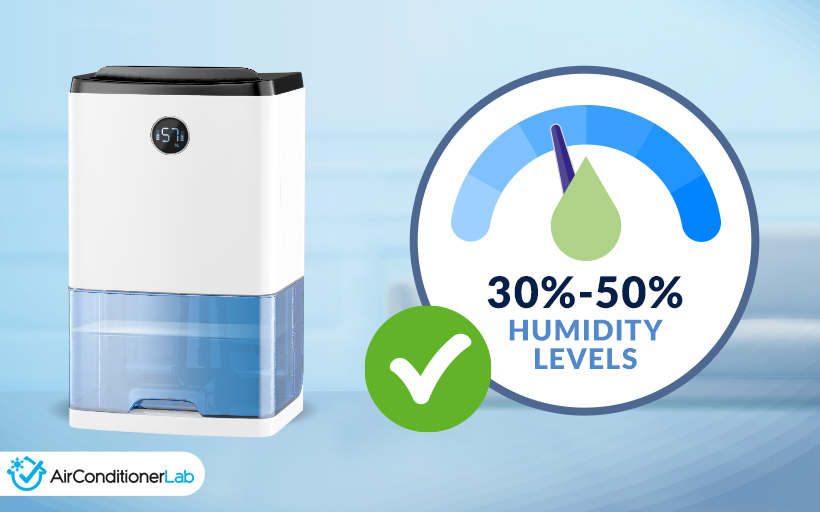
Too much moisture can lead to condensation, and we all know that electricity and condensation aren’t the best of friends.
Also, too little can produce static electricity, which is equally as bad.
In most cases, you might encounter humidity level issues if your server is in a basement, top floor, attic, or near an exterior wall.
Thankfully, a lot of AC equipment nowadays comes with built-in humidity control options and built-in dehumidifiers to maintain optimal humidity levels, so this shouldn’t be a problem as long as your home or office is built properly.
ACLAB note:
To maintain the electronic equipment in the servers rooms, you have to manage booth cooling and humidity. It is thus important for an AC to also have humidity control.
Get a hygrometer to monitor the humidity levels. If they get too high or too low, you will need to invest in a good dehumidifier or a powerful humidifier respectively.
Related article: Dehumidifier versus ACs compared
Is it a portable unit?
Portability is often overlooked, which I don’t really get.
Portable ACs or spot coolers are not only a cost-effective cooling solution - but they essentially make server room cooling effortless.
These units are super easy to set up.
All you need to do is position them in front of a server, and you’ll have yourself a very effective cooling solution, with these puppies blowing cold air directly into the server racks and ensuring proper temperature control and adequate air circulation.
And if you ever need to move your equipment or add some more to the room - you can just move the AC with it.

Does it filter the air out?
Air filtration is another key function of every air conditioner.
This technology is responsible for removing dust, dirt, odor, allergens, mold, and bacteria from the room to ensure clean air.
There are several different types of air filters used in air conditioners, such as washable or reusable filters (stronger cloth-based material and relatively cheap), fiberglass filters (which can only be used once), or pleated filters (polyester material).
Pretty much any of them should be good at keeping most of the dirt outside, but you’ll still have to do some “maintenance” from time to time because you just can’t get away from dust.
Venting
Ventilation is the final aspect to consider.
In most cases, small server rooms won’t require any additional heat removal, as most ACs already do a pretty good job extracting heat from the space.
On the other hand, if you’re dealing with something a bit bigger - say 800 square feet or more - a few exhaust vents positioned in the ceiling or behind equipment could be a good move.
Why are air conditioners necessary in server rooms?
Simply put, air conditioners are essential in server rooms to maintain optimal conditions and prevent overheating of the servers.
The cold air they blow directly into the space (or a server rack) helps to keep the temperature and humidity level within the desired range, which is:
In my experience, as long as you’re not cracking 80 degrees Fahrenheit - you’re good.
The latest equipment used in server rooms can easily withstand temperatures up to 110 degrees, so if your server room is at 78 degrees - don’t worry.
You simply have to remove the heat generated by servers, computers, and other networking equipment.
In other words, an air conditioner for your server room is a necessity if you want to protect your equipment from overheating.
ACLAB note:
IT equipment in server rooms generate a lot of heat. Too much heat can damage the equipment and thus effective heat removal is essential in making sure that the server does not face any downtime or disruption of services.
How do I vent a portable AC in a server room?
Here’s how you can vent your portable AC units in the server rooms to prevent overheating.
ACLAB note:
If you’re venting through a window - setting it all up will only take a few minutes, as most of these come with window kits that fit most standard windows.
That’s it. After you're done, check on the hose every now and again, as some of them can get a bit loose over time.

FAQ
What type of AC is best used in the server room?
The best type of AC for server rooms depends largely on the type of server room.
For instance, a small server room is best cooled with a portable AC or a ductless mini-split system, while a large operation, like a data center, would benefit from a high-end PAC or CRAC solution.
How do you calculate the AC size for the server room?
In order to calculate the AC size for a server room, you must first know the server room size. Once you do, allocate 30 BTU per square foot of space, and you should have a rough estimate.
If you have people working within the data center or a server room, account for their BTU (which is about 400), and choose an appropriate air conditioning system.
Can I keep a portable air conditioner running continuously?
You can keep a portable air conditioner running continuously as long as you maintain it properly (empty the condensation tank, for example).
As long as it automatically shuts off when the temperature is right, you also don't have to worry about electricity bills being too high, even with constant use.
How do I cool a server room without air conditioning?
The only way to cool a server room without air conditioning is with proper ventilation.
Having a vent directly behind a server closet or a rack and drawing the toasty air right from the source can lower the server room temperature significantly, which in properly temperature-isolated spaces could be more than efficient.
To make this cost-efficient, you could add a thermostat and a temperature probe near the server rack so your exhaust vents kick in only when necessary.
Summary – Which server room AC do I buy?
As you can see, there are quite a few ACs you can use to cool down your server room.
From impeccable rack enclosure cooling solutions like Tripp Lite SRCOOL2KWM, over excellent mid-sized room solutions like Senville SENA-18HF/D, all the way to the mighty KwiKool KIB2421-2 for large server rooms, I’ve covered it all so you can find the absolute best, most efficient, most effective, cooling solution for your server room.
And, seeing how you've read all about the different features and considerations for these cooling devices, there's no doubt in my mind you'll make the right pick for your needs!
My #1 Recommendation
Tripp Lite SRCOOL2KWM
- Easy-to-follow manual
- Super-efficient close-coupled cooling
- More powerful than it seems
- Affordable and cost-effective product
- Ideal for small, cramped spaces